TeaWorld Audit Process v2
Revision Date #
October 23, 2020
Steps #
- Open the Work Order in Accurants.
- Review Invoice and all supporting documentation against the Work Order and the Notes captured on the call.
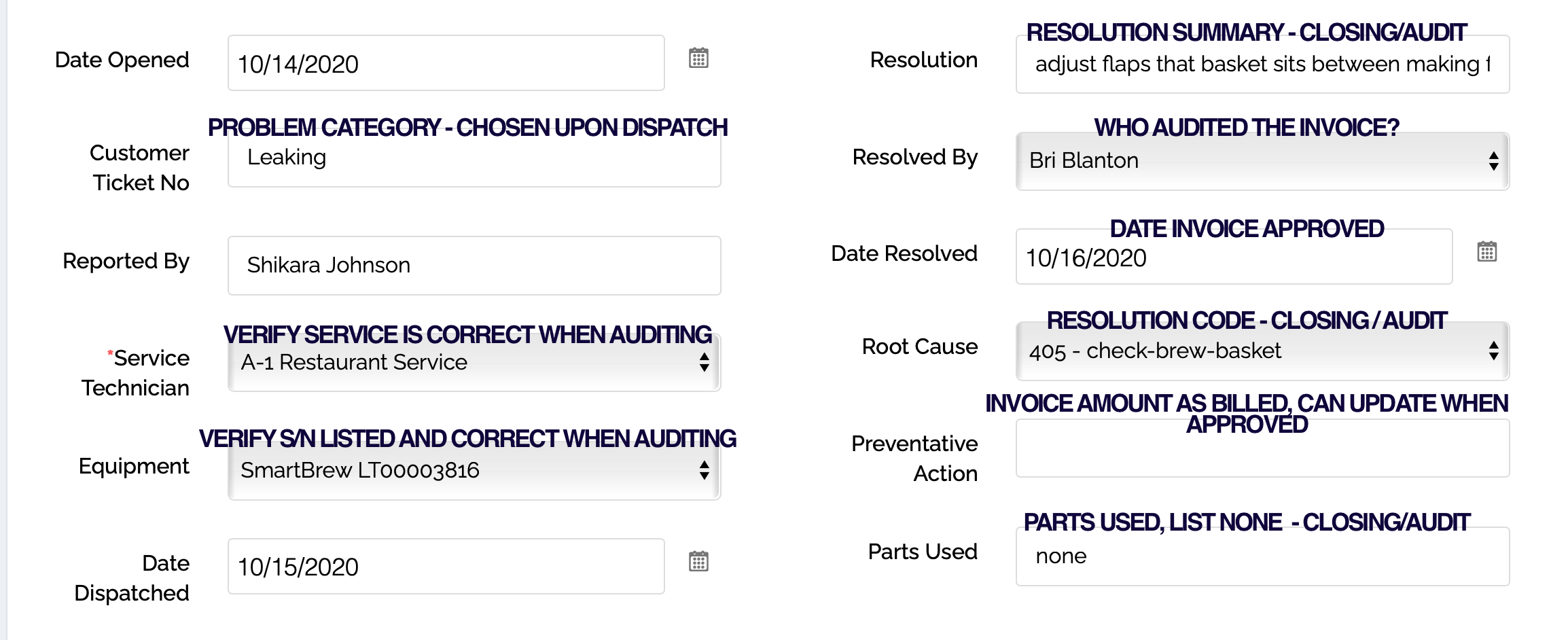
- Scroll to the bottom of the WO and review/update the following fields
1). Customer Ticket No Should list one of the problem categories, this is the reason for the call and should be assigned as dispatch.
2). Service Technician Double check that the Tech listed is the Tech who serviced the call.
3). Equipment Make sure the correct Equipment Serial Number has been slected..
4). Resolution This may have been updated when the call was closed, , but this should be a brief summary of the resolution.
5). Resolved By Name of the person auditing the invoice.
6). Date Resolved Date the invoice was approved.
7). Root Cause Categorization of the resolution.
8). Preventative Action What is the invoice amount? Even if we are disputing the invoice, list the original invoice amount here. This can be changed when the invoice is finally approved to reflect the agreed upon amount.
9). Parts Used Please list none as soon as we know that no parts have been used. If blank we are going to assume parts may have been used. If parts are used, please list them.