
Check Customer / Store ID
Possible Cause #
- Customer and/or Store ID
What to Check - Field #
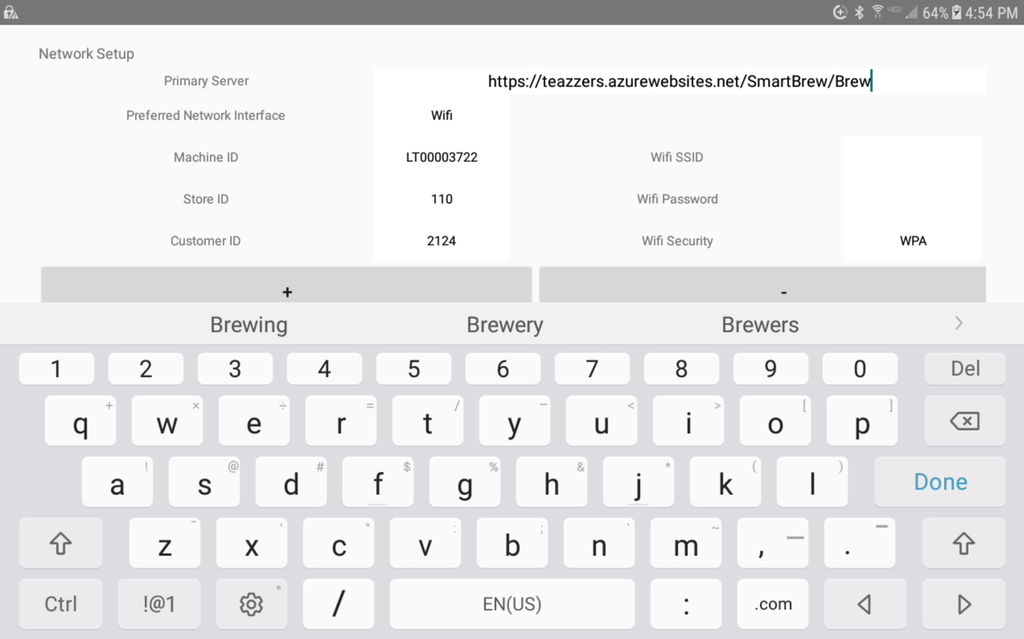
- Store ID should match data from TeaWorld. This is the unit number of a Location.
- Customer ID should match the account number of the Parent Company record from TeaWorld.
Action Needed - Field #
- Enter App Network Setup Screen (13375)
- Update Store ID and/or Customer ID so that it matches data provided.
- Exit Network Setup
- Return to Network Setup screen
- Poll Server for latest updates.
- Verify communication with TEAZZERS.
Caution #
Resolution
Did Check Customer / Store ID resolve the issue?
Yes, resolution code 504.
No, go to next step.