
Enter Pro Kiosk Mode
Possible Cause #
The Knox Configure application locks the tablet down to only running the NEWCO Touch app and prevents users from accessing other Android applications or features. The SmartBrew machine should always be operating in Pro-Kiosk mode unless a technician is servicing the machine and needs to access the Andoid operating system.
What to Check - Phone #
- Turn machine off, app should stop running and TEAZZERS Warning wallpaper should appear on screen.
Action Needed - Field #
- Sipe up to reveal folder called Hide.
- Enter the folder
- Lauch the Settings app
- Scroll to bottom of the list on the left side and choose About Tablet
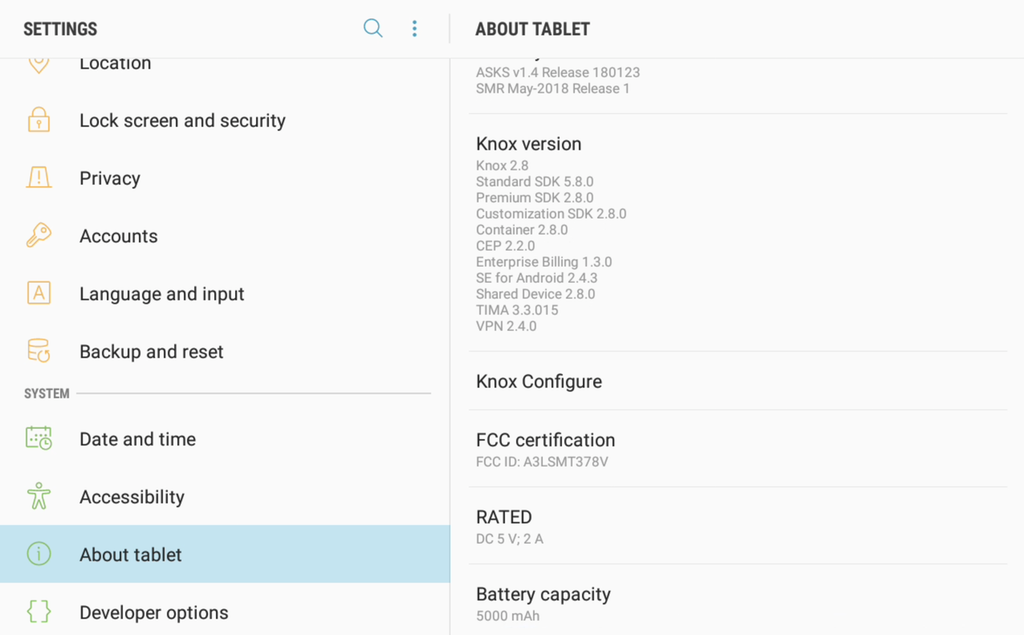
- Now, scroll the right side of the screen to Knox Configure
- Select Apply latest profile
- Confirm the dialog box presented
- Click Apply
- Tablet will reboot itself and be ready for use
Resolution
Did Enter Pro Kiosk Mode resolve the issue?
Yes, resolution code .
No, go to next step.